
50K Training Plan Generator
Build a 50K ultra plan with back-to-back weekend runs for your weeks, days and level.
Recent
Your last 10 settings, saved only in this browser. Nothing is uploaded.
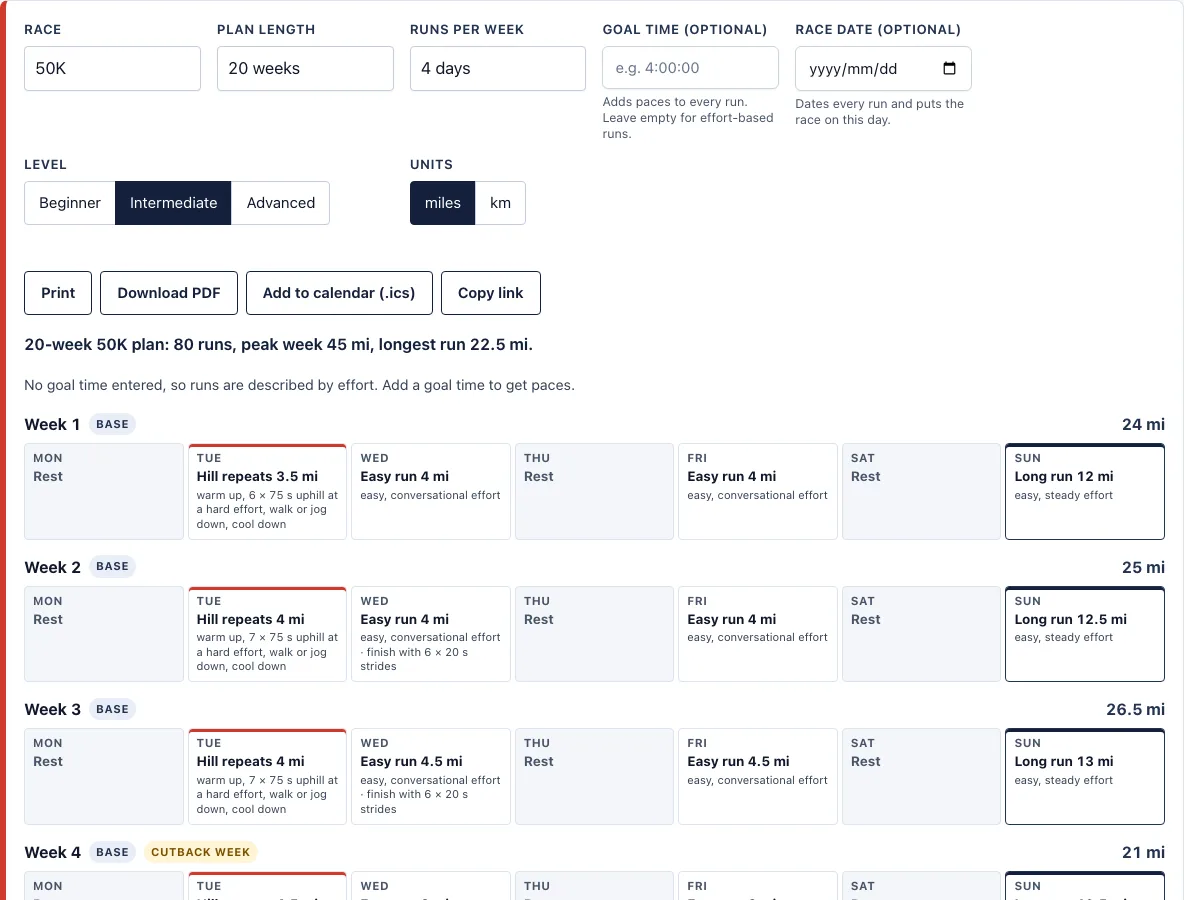
How to use the 50K training plan tool
- Set Race to 50K.
- Choose a Plan length between 16 and 24 weeks. The page starts at 20.
- Pick Runs per week: 3, 4, 5, or 6 days. The page starts at 4.
- Pick your Level: Beginner, Intermediate, or Advanced.
- Optional: enter a Goal time. You then get a box of training paces per mile or km. Without one, each run is described by effort, such as “easy, conversational effort.”
- Optional: enter a Race date. Every run gets its date, and the race falls on that day. Week 1 starts on a Monday. Without a race date, long runs fall on Sundays.
- Choose Units: miles or km. This changes every pace and distance.
- Read the summary line, then scroll through the weeks. Each week shows its phase, any cutback week marking, and its total.
Print prints only the plan. Download PDF makes a text PDF of the whole plan in your browser. Add to calendar (.ics) creates a file with one all-day event per run for Google Calendar, Apple Calendar, or Outlook. Copy link keeps your settings in the page address, so you can share or bookmark the exact result. Changing runs per week or level rebuilds every week, including the back-to-back runs. A back-to-back run is added only when the day before a long run is a running day, so the number of runs per week also changes how often they appear.
How long should I train for a 50K?
The tool offers 16 to 24 weeks for a 50K, and this page starts at 20. A longer plan gives you more weeks to build up gradually, which matters when the race is much longer than a marathon.
The plan follows a few fixed rules. No week is more than 10% above the largest earlier week. Every 4th week is a cutback week at about 80% of the load. The plan has four phases. Base is the first 40% of the build, with easy runs, strides, and hill repeats. Build is the next 40%, with tempo runs and intervals. Race-specific is the last 20%, with race-pace runs. A 50K plan ends with a 3-week taper. Hard sessions never fall the day before or after the long run.
As a worked example, a 20-week plan with 5 runs a week, intermediate level, and a 5:30:00 goal gives 100 runs. Its peak week is 50 mi (80.5 km), its longest run is 22.5 mi (36.5 km), and its goal race pace is 10:37/mi.
What are back-to-back long runs?
Back-to-back long runs are two long runs on consecutive days: a second, shorter long run the day before the main long run. They start in the build phase, so they are not in the early base weeks. In every non-cutback week from the build phase on, the day before the long run has a second run of about 60% of the long run’s distance, capped at 24 km.
The second run adds fatigue on the day before the long run, so the main long run is done on tired legs. Cutback weeks skip the back-to-back run, so your legs get a lighter week before the next build.
Can a beginner use the 50K plan?
Yes. Choose Beginner, and the long runs top out at 35 km, compared with 38 km for intermediate and 42 km for advanced runners. Beginner plans follow the same phase and 10% rules as the other levels.
How do I pick a plan length for a 50K?
The tool offers 16 to 24 weeks, and the page opens with 20. Pick the longest plan your schedule allows, since the 10% rule limits how fast weekly distance can rise and a longer plan gives that rise more weeks.
Frequently asked questions
How long should my longest run be for a 50K?
Long runs top out at 35 km for beginner, 38 km for intermediate, and 42 km for advanced. The long run is also capped as a share of the week. The worked example for an intermediate 20-week plan peaks at 22.5 mi (36.5 km).
Can I use this as an ultra marathon training plan?
The plan is built for 50 km. For other ultra distances, use it only as a starting point and adjust the long runs and taper to your race.
How many runs a week should I pick?
The tool offers 3, 4, 5, or 6 runs a week. The worked example in the explain section uses 5 runs a week with a 5:30:00 goal, which gives 100 runs.
Does the plan have a taper?
Yes. A 50K plan tapers for 3 weeks, the same as a marathon.
Can I print it?
Yes. Print prints only the plan. Download PDF gives you a text PDF of the whole plan, made in your browser.
Do the paces work on trails?
Trail long runs depend on terrain, so treat the pace range as a guide. On hills, effort matters more than pace.
Is this medical advice?
No. Build up gradually, and ask a doctor first if you have a health condition.
Can I use the plan commercially, for example with runners I coach?
Yes. Plans, PDFs and calendar files you make here are free to use for any purpose, including handing them to runners you coach, with no credit needed. You may not copy the generator or the site itself; see the terms.
Related tools
- Marathon training plan: use this if you are preparing for 42.2 km and want a shorter build.
- Half marathon training plan: use this for a 21.1 km race with a shorter plan length.
- 5K training plan: use this if you are just starting and want a short race first.
- 10K training plan: use this for a 10 km race as a step toward longer distances.
- Beginner running plan: use this if you are new to running and want to start more gently.
- Training pace calculator: use this to get training paces from a recent race result.
- Pace chart for this race: use this to see split times for a race at a given pace.
- Pace band: use this to carry your target pace on race day.
- Methodology: formulas and plan rules: use this to read the formulas and rules behind every plan.