
5K Training Plan Generator
Set your weeks, running days, level and goal time to get a 5K plan with every run spelled out.
Recent
Your last 10 settings, saved only in this browser. Nothing is uploaded.
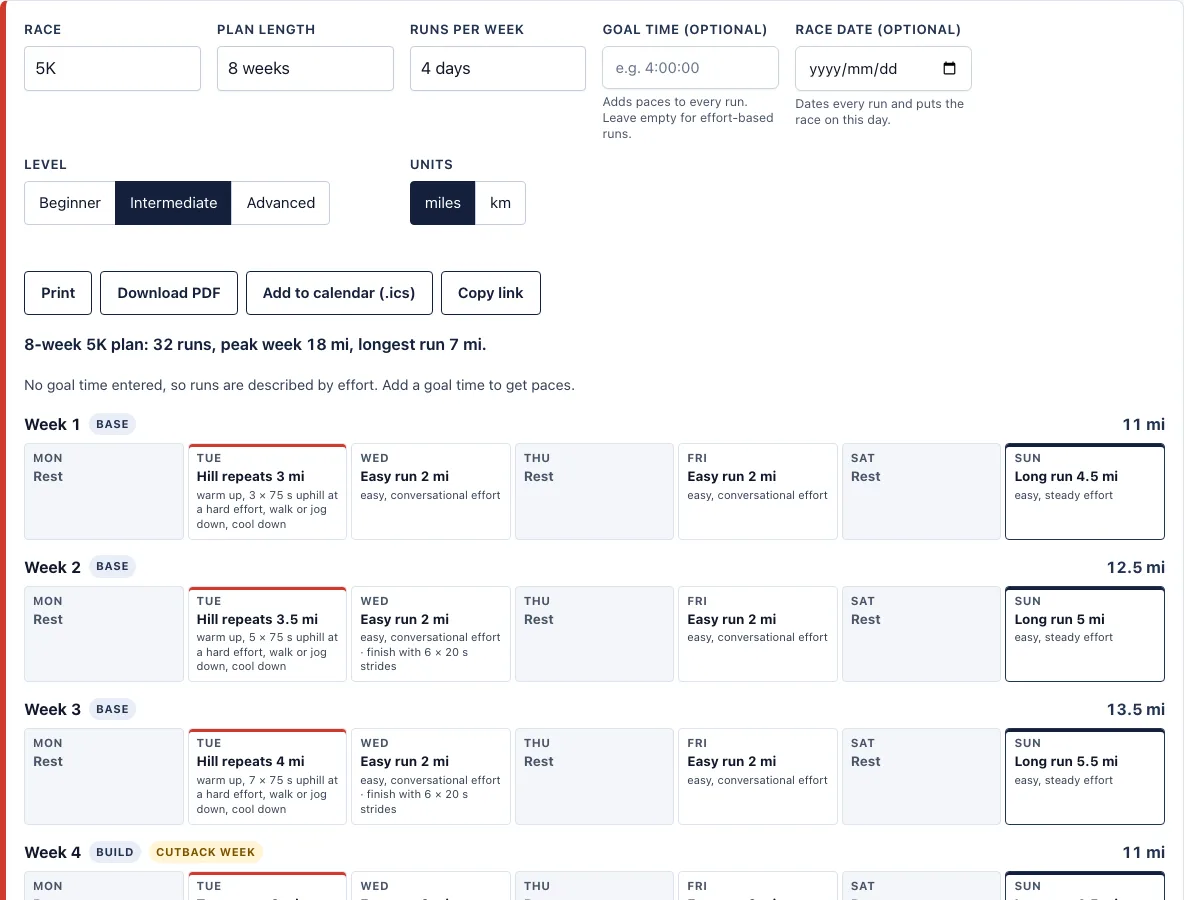
How to use the 5K training plan tool
- Set Race to 5K.
- Set Plan length in weeks. For a 5K you can choose 6 to 12 weeks. The page opens with 8.
- Set Runs per week to 3, 4, 5 or 6. The page opens with 4.
- Set Level to Beginner, Intermediate or Advanced. The page opens with Intermediate.
- Optionally, enter a Goal time, such as 0:25:00, to get a pace range for every run.
- Optionally, enter a Race date. Week 1 then starts on a Monday, and the race falls on that day.
- Choose Units, miles or km.
- Read the plan. A summary line shows the number of weeks and runs, the peak week distance and the longest run. Each week is shown as seven day boxes, Monday to Sunday.
Print prints only the plan, not the rest of the page. Download PDF saves a text PDF of the whole plan, made in your browser. Add to calendar (.ics) creates one all-day event per run for Google Calendar, Apple Calendar or Outlook. Copy link keeps your settings in the page address, so the link opens the same plan. The miles/km switch changes every pace and distance, and your choice is remembered in this browser. Changing the plan length, runs per week or level rebuilds every week, so change one setting at a time if you want to see its effect.
How long does it take to train for a 5K?
The tool offers 6 to 12 weeks for a 5K, and the page opens with an 8-week plan. Longer plans spread the build-up over more weeks, so each week asks a little less of you. A 12-week plan keeps the same phases over a longer build.
Each plan is split into phases. The base phase covers the first 40% of the build and uses easy runs, strides and hill repeats. The build phase covers the next 40% and adds tempo runs and 800 m interval repeats. The race-specific phase covers the last 20% and uses 1 km repeats at goal race pace. A 5K plan then finishes with a one-week taper, which is the race week.
Load rises in a controlled way. No week is more than 10% above the largest earlier week. Every 4th week is a cutback week at about 80% of normal, which gives your body a lighter week to absorb the work. Long runs top out at 10 km for beginners, 14 km for intermediate runners and 18 km for advanced runners.
How many days a week should I run to train for a 5K?
You can choose 3, 4, 5 or 6 runs a week, and the page opens with 4. Pick the number you can fit in while still recovering between sessions. Fewer runs leave more rest days, and more runs add more easy mileage.
The tool places the runs so that hard sessions are never on the day before or after the long run. Hard sessions are hills, tempo, intervals and race-pace runs. Easy runs are at least 3 km, so a short day still counts as a real run.
What if I cannot run for 20 minutes yet?
Someone who cannot yet run 20 to 30 minutes without stopping should start with the beginner run-walk plan instead. That plan has 8, 9 or 10 weeks and builds up to 30 minutes of running without walking, so it can lead into this plan once you are comfortable.
Can I use this plan with walk breaks?
This plan does not use run-walk sets. For walk breaks from the first week, use the beginner running plan, which is built around run-walk sessions and includes a session timer.
Frequently asked questions
Is this 5K training plan good for beginners?
Yes. Choose the Beginner level, and the long runs top out at 10 km. If you cannot yet run 20 to 30 minutes without stopping, start with the beginner running plan instead, which uses walk breaks.
What pace should I run my training runs?
Enter a goal time, and the page shows a box of training paces above the weeks, with a pace range for every run. For a 0:25:00 goal at intermediate level, the tool gives an easy pace of 10:26 to 11:48 per mile and a goal race pace of 8:03 per mile. Without a goal time, each run is described by effort, such as “easy, conversational effort.”
Can I print the plan?
Yes. Print prints only the plan, not the rest of the page. Download PDF gives you a text PDF of the whole plan, made in your browser.
Can I add the runs to my calendar?
Add to calendar (.ics) creates one all-day event per run, for Google Calendar, Apple Calendar or Outlook. If you did not enter a race date, the plan starts next Monday. Saving plans, moving missed runs, calendar sync and reminders are coming soon.
Can I save or share my exact plan?
Yes, in part. Your settings are kept in the page address, so Copy link shares or bookmarks the exact result. Saving plans inside the tool is coming soon.
Do I need a doctor’s approval before I start?
This tool does not give medical advice. Build up gradually, and ask a doctor first if you have a health condition.
Can I use the plan commercially, for example with runners I coach?
Yes. Plans, PDFs and calendar files you make here are free to use for any purpose, including handing them to runners you coach, with no credit needed. You may not copy the generator or the site itself; see the terms.
Related tools
- 10K training plan: use this if you want to move up from 5K to a 10K race.
- Beginner running plan: use this if you cannot yet run 20 to 30 minutes without stopping.
- Training pace calculator: use this to get training paces from a recent race result.
- Pace chart for this race: use this to see split times for a 5K at different paces.
- Half marathon training plan: use this when you are ready to train for 13.1 miles.
- Marathon training plan: use this if your next goal is a full marathon.
- Methodology: formulas and plan rules: use this to read the formulas and rules behind every schedule.