
Beginner Running Plan: Run-Walk to 30 Minutes
Start from walking: three short run-walk sessions a week build up to 30 minutes of running.
Recent
Your last 10 settings, saved only in this browser. Nothing is uploaded.
RunPacePlan’s beginner running plan is a free run-walk schedule for new runners. You choose 8, 9 or 10 weeks and 3 or 4 sessions a week, and the plan builds up from short running bursts to 30 minutes of continuous running. The tool runs entirely in your browser, so nothing you type is uploaded or stored on a server. There is no account or sign-up. The session timer counts your warm-up walk, each run and walk, and your cool-down, with a short beep at every change.
Each session starts and ends with 5 minutes of brisk walking, with a run-walk set in between. The plan adjusts each week based on the rule explained below, so you always know what to do in your next session. You can print the schedule, add the sessions to your calendar, or share the exact result with a link.
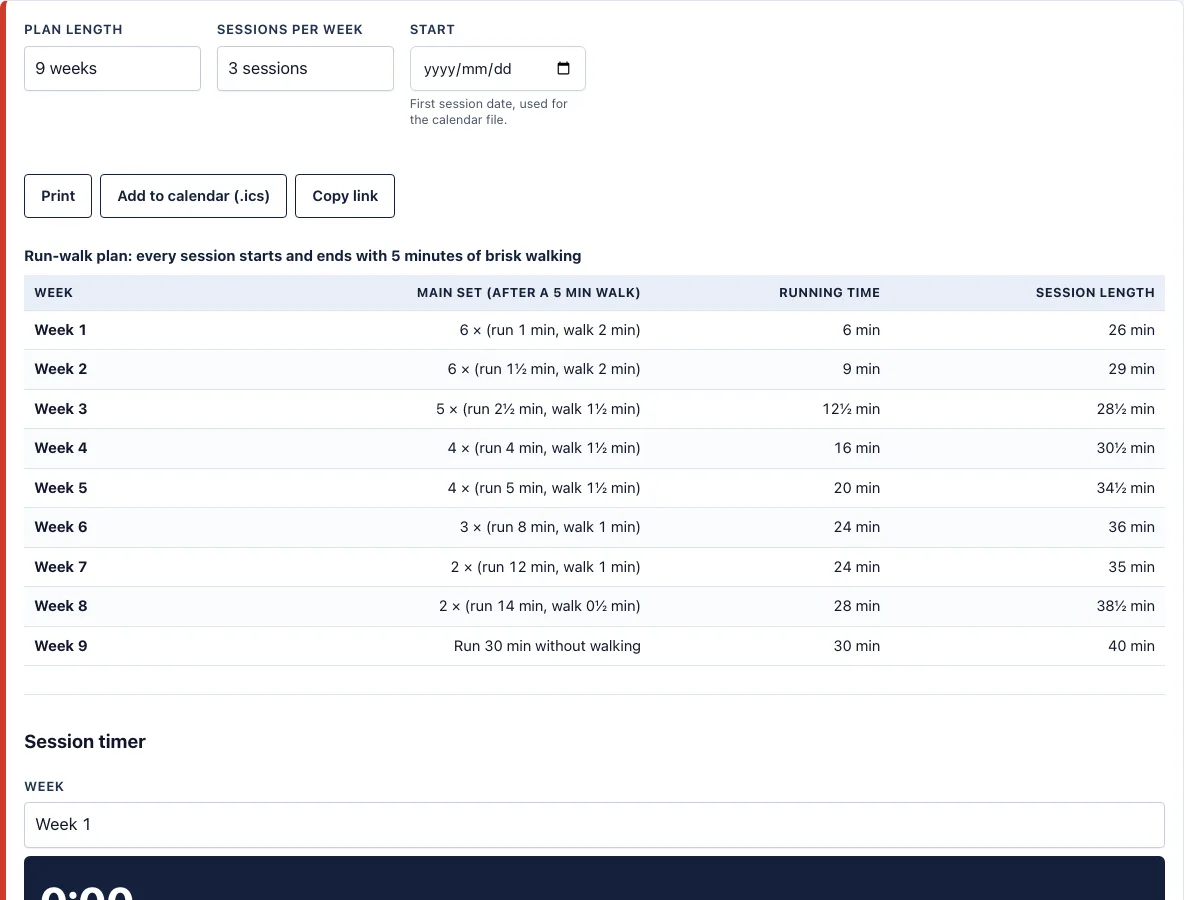
How to use the beginner running plan tool
- Choose the number of weeks: 8, 9 or 10.
- Choose the number of sessions a week: 3 or 4.
- Optionally, pick a start date so the schedule lines up with your calendar.
- Read the table of weeks. It shows the main set, the running time and the total session length for each week.
- Press Add to calendar (.ics) to save one event per session. With 3 sessions, the events fall on Monday, Wednesday and Saturday. With 4 sessions, Thursday is added.
- To start a session, choose the week and press Start on the session timer. It counts the warm-up walk, each run and walk, and the cool-down, with a short beep at every change. Use Pause/Resume if you need a break, or Reset to start again.
Press Print for a paper copy, or Copy link to share or bookmark the exact result, since the settings are kept in the page address. Changing the number of weeks or the number of sessions rebuilds the table, so the running time in each week changes with it. The calendar file has one event per session on the days listed in step 5, so it matches the table. On a phone, the table scrolls sideways inside its box, and the session timer works during a run. Keep the table open on the day of each session so you can check which week and run you are on.
How do I start running as a complete beginner?
Start with short running intervals separated by walking, and keep the running time small at first. The plan begins with 1 minute of running and 2 minutes of walking, repeated six times, so the first week is mostly walking. Start with the first session even if it feels easy, since week 1 is built to be easy.
Each week, the running interval gets longer and the walking breaks get shorter. Week 1 has 6 minutes of running in total, and week 2 has 9 minutes. Your body gets used to the effort in small steps rather than in one big jump. This is the core rule of the plan. RunPacePlan generates the schedule with its own rule, where the running interval grows geometrically and the walk breaks shrink, rather than copying an existing program.
How long does it take to run 30 minutes without stopping?
On the 9-week plan, you reach 30 minutes of continuous running in week 9, which is the final week. The running interval grows from 1 minute to 30 minutes, and the walk breaks shrink from 2 minutes to none.
The total running time per session never goes down from one week to the next. In week 6, you run 8 minutes at a time with 1-minute walks, for 24 minutes of running. In week 8, you run 14 minutes at a time with 30-second walks, for 28 minutes. The timing depends on how many sessions you do each week and how well you keep to the schedule. If you need more time at a stage, repeat that week rather than moving on early.
What is the session timer for?
The session timer counts the warm-up walk, each run and walk, and the cool-down, with a short beep at every change. Choose a week and press Start, then use Pause/Resume or Reset when you need them. You can keep the phone in your pocket and listen for the beep.
Do I still walk in the final week?
Yes. Every session starts and ends with 5 minutes of brisk walking, even in the 9-week plan, where week 9 is 30 minutes of running with no walk breaks. The walk breaks shrink to none, but the warm-up and cool-down stay in every session.
Frequently asked questions
How often should a beginner run?
The plan uses 3 or 4 sessions a week, with a rest day between most of them. Three sessions is a gentler start, and four adds a Thursday session. Choose the number that fits your schedule and keep your rest days.
What if a week feels too hard?
Repeat that week. The plan is a guide, not a test, and repeating a week that feels too hard is fine. Move on when the current week feels manageable.
Is it free and can I print it?
Yes. The tool is free, needs no account, and runs in your browser. Press Print to get a paper copy of the table of weeks. On a small screen, the table scrolls sideways.
Should I check with a doctor first?
Yes, if you have a heart condition, chest pain, dizziness or other health concerns. Ask a doctor before starting any running plan in those cases.
Can I use the plan on my phone?
Yes. The page works on phones, and the session timer is made to be used on the run: press Start, put the phone away and listen for the beep at each change.
Can I use the plan commercially, for example with runners I coach?
Yes. Plans, PDFs and calendar files you make here are free to use for any purpose, including handing them to runners you coach, with no credit needed. You may not copy the generator or the site itself; see the terms.
Related tools
- 5K training plan: Use it when you want to build toward running 5 kilometres.
- 10K training plan: Use it when you are ready to aim for 10 kilometres.
- Pace calculator: Use it to work out the pace for a target time and distance.
- Running cadence calculator: Use it to check how many steps per minute you take while running.
- Treadmill incline calculator: Use this to see how an incline changes your treadmill pace.
- Heart rate zone calculator: Use it to find training zones based on your heart rate.
- Zone 2 heart rate calculator: Use it to find the easy, conversational effort zone for base running.
- Methodology: formulas and plan rules: Read it to see the formulas and rules behind the plans and calculators.