
Couch to 5K Plan: 9 Weeks of Run-Walk
Nine weeks, three sessions a week: walk and run in turns until you can run for 30 minutes.
Free · runs in your browser · nothing is uploaded
Recent
Your last 10 settings, saved only in this browser. Nothing is uploaded.
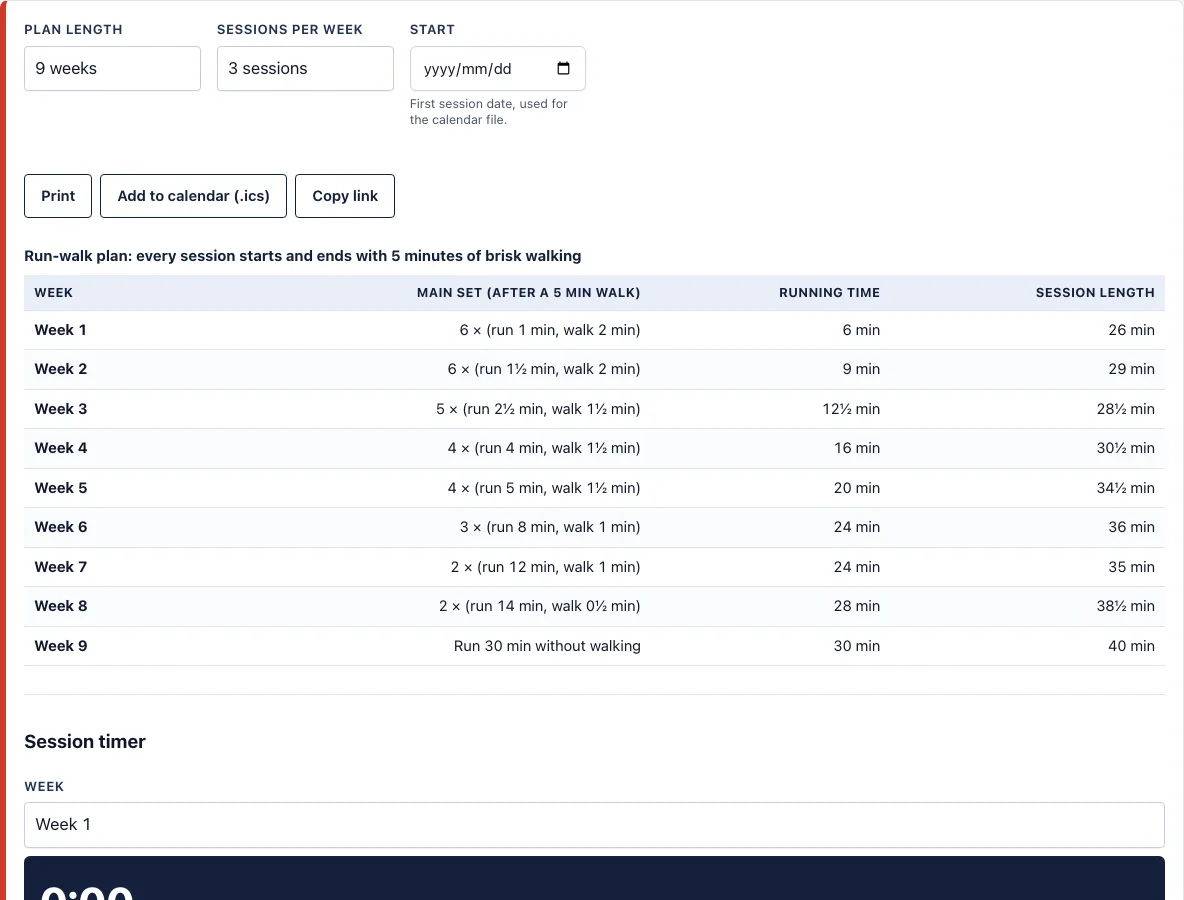
How to follow the Couch to 5K plan
- Look at the table. Each row is a week and shows the main set, the running time and the length of the whole session.
- Pick a start date if you want the sessions to appear in your calendar, then press Add to calendar (.ics). With 3 sessions a week the events fall on Monday, Wednesday and Saturday.
- On the day, choose the week in the session timer and press Start. Walk 5 minutes, then follow the beeps: run, walk, run, walk.
- Run slowly enough to talk in short sentences. If you cannot, walk until you can and carry on.
- Finish with the 5 minutes of walking, then leave at least one day before the next session.
- When a week feels too hard, repeat it. Move on when it feels manageable.
- In the last box, type the pace you can hold while still breathing easily to see how far 30 minutes of running takes you and how long a 5K would take at that pace.
Press Print for a paper copy or Copy link to keep the exact settings. The table scrolls sideways inside its box on a phone, and the timer keeps counting if you put the phone in a pocket.
How long does Couch to 5K take?
The plan takes 9 weeks with 3 sessions a week, which is 27 sessions in all. Week 1 is six repeats of 1 minute of running and 2 minutes of walking, so you run for 6 minutes in total. Week 4 is four repeats of 4 minutes running and 1½ minutes walking, 16 minutes of running. Week 6 is three repeats of 8 minutes running and 1 minute walking, 24 minutes. Week 9 is 30 minutes of running with no walking breaks. The running time never goes down from one week to the next, and the walking breaks shrink as the running gets longer. If you need more time at some stage, repeat that week before you move on.
Does Couch to 5K get you to 5K?
By the end you can run for 30 minutes, and whether that is 5K depends on your pace. Covering 5 km in 30 minutes takes 6:00 per km, which is 9:39 per mile. At a slower jog of 10:00 per mile, 30 minutes covers 3 miles, about 4.8 km. At 12:00 per mile it covers 2.5 miles, about 4.0 km. So week 9 may end short of 5K or past it, and the pace box on this page shows your own number instead of promising one. Running 5K at a slower pace is a perfectly good result. Once you can do it, the 5K training plan gives you the next step, and the 5K pace chart lists the pace for every finish time.
How many times a week should I do Couch to 5K?
Three sessions a week is the standard, with a rest day between them: Monday, Wednesday and Saturday is a common pattern. A fourth session is available in the tool for people who want one, but three is a gentler start. Rest days are when your legs adapt, so skipping them does not speed things up. If you miss a session, do not double up. Pick the plan up where you left off.
Can I do Couch to 5K on a treadmill?
Yes. Set the belt to an easy jogging speed and use the same intervals. Jones and Doust (1996) found that a 1% incline best matches the effort of running outdoors at faster running speeds, and many runners use the same setting at easy speeds. The mph to minutes per mile converter turns belt speed into pace, and the treadmill pace chart lists common settings.
Frequently asked questions
Is Couch to 5K free here?
Yes. The plan, the timer, the print view and the calendar file are free, with no account needed. Plans you make here are free to use for any purpose, including handing them to a friend you are coaching.
What should I do if I cannot finish a run interval?
Slow down or walk until your breathing settles, then start the next interval. Repeat the week if you need to. Running slowly is the main skill in the early weeks.
Should I check with a doctor first?
Yes, if you have a heart condition, chest pain, dizziness, joint problems or other health concerns, or you have been inactive for a long time. Ask a doctor before starting any running plan.
How is this different from the beginner running plan?
The beginner running plan lets you choose 8, 9 or 10 weeks and ends at the same 30 minutes. This page is the 9-week version with the pace box that shows how far 30 minutes takes you and what a 5K would take at that pace.
Do I need running shoes?
You need shoes that are comfortable and in good condition.
Can I use the timer with the screen off?
The timer runs while the page is open in your browser. Keep the page open and the sound on. Some phones pause pages after the screen locks, so test it with the first session on a walk day.
Can I use the plan commercially, for example with runners I coach?
Yes. The schedule, the printout and the calendar file you make here are free to use for any purpose, including giving them to beginners you coach, with no credit needed. You may not copy the generator or the site itself; see the terms.
Related tools
- Beginner running plan: Use it to choose 8, 9 or 10 weeks of run-walk sessions.
- 5K training plan: Use it when you can run 30 minutes and want a plan for a 5K race.
- 5K pace chart: Use it to see the pace for any 5K finish time.
- Pace calculator: Use it to work out your pace from a time and distance.
- Running cadence calculator: Use it to check your steps per minute.
- Treadmill pace chart: Use it to match treadmill settings with paces.
- Methodology: formulas and plan rules: Read how the plan is generated.