
Marathon Pace Band Generator
Type your goal time to make a printable pace band with a split for every mile or km.
Recent
Your last 10 settings, saved only in this browser. Nothing is uploaded.
Marathon Pace Band is a free tool that makes a printable pace band for a 26.2-mile marathon. You enter a goal time, and it works out your average pace and a split-time chart showing the elapsed time you should reach at every mile or kilometre. You can wear the printed band on your wrist during the race.
The tool also makes bands for half marathons, 10K and 5K races. It runs entirely in your browser, so nothing you type is uploaded or stored on a server. Each result shows the average pace, a preview of the band, and buttons to download a PDF, print, or copy a link. A pace band is most useful when you have a target finish time and want to check your progress without stopping to look at your watch.
How to use the Marathon Pace Band
- Choose the race in the Race control: marathon, half marathon, 10K or 5K.
- Type your target finish time in the Goal time field.
- Under Times at, pick every mile or every km.
- Under Text size, pick Regular or Large.
- Check the average pace and the preview. The preview lists the cumulative time at each marker, a half-way row for the marathon and half marathon, and the finish.
- Click Download PDF for a Letter-size file, or click Print.
Click Copy link to share the exact result or save it as a bookmark, because your settings are stored in the page address.
Each output has its own use. Download PDF saves a Letter-size file made in your browser. Long kilometre bands use two columns in the PDF instead of one. Print sends the band straight to your printer. Choose Large under Text size if you want bigger figures on the band, and Regular for the smaller text.
Check the preview before you download anything. Confirm that the average pace matches the goal time you meant to type. If it does not, correct the goal time first, so the file you download matches the result you want to race to. Look at the preview again after each change to the race, goal time or Times at setting, because each one changes the rows you will print.
What is a pace band?
A pace band is a printed strip that lists the total elapsed time you should reach at each mile or kilometre marker of a race. It assumes you hold an even pace from start to finish. You compare the band with your watch at each marker to see whether you are on target.
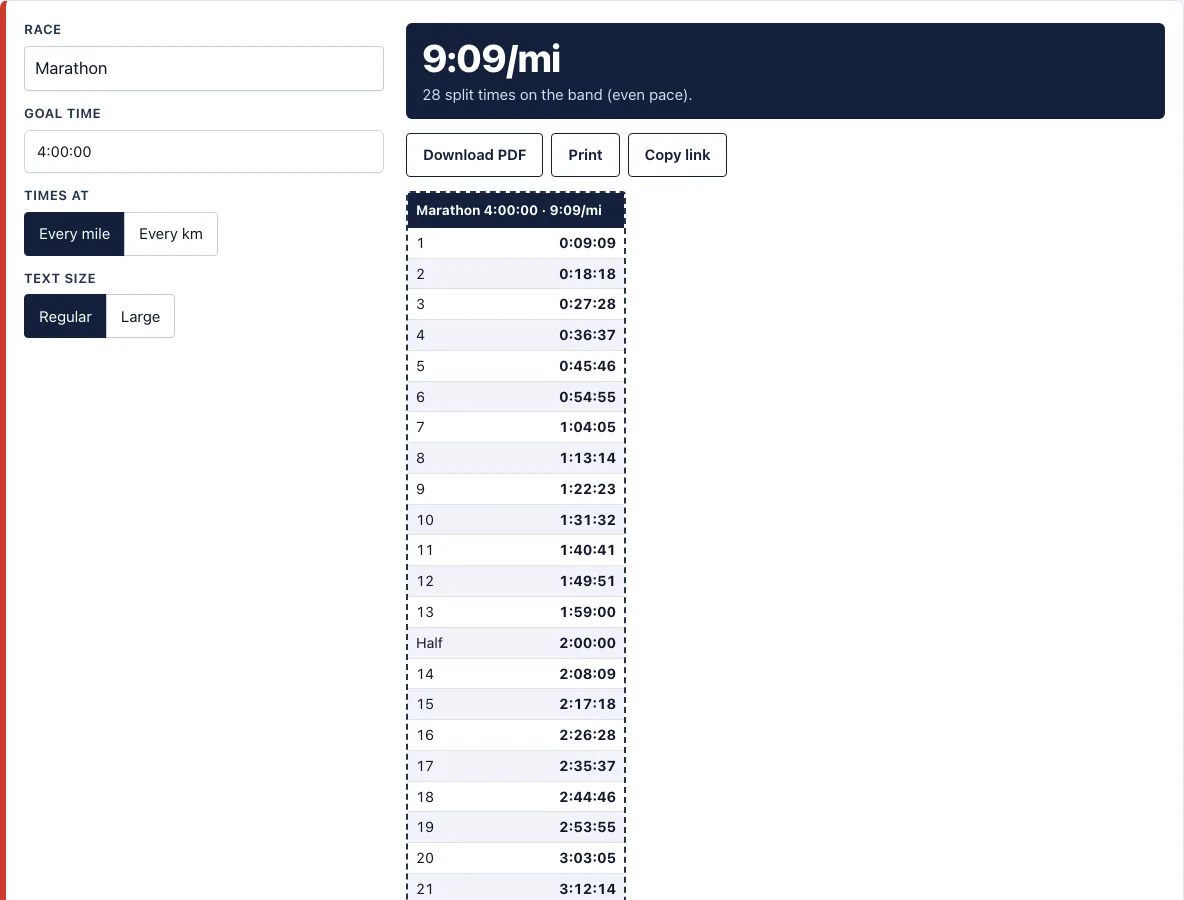
The band shows cumulative time, not the time for each individual mile. For a 4:00:00 marathon, mile 1 is 0:09:09 and mile 13 is 1:59:00. These are the running totals you should see on your watch, not the length of each split.
How do I make a marathon pace band?
Divide your goal time by the race distance to get your average pace per mile or kilometre. Then add that pace to a running total at each marker. For a 4:00:00 marathon, the pace is about 9:09 per mile, so the band starts at 0:09:09 at mile 1 and reaches the half-way mark at 2:00:00.
The tool does this for you. It lists 28 split times for a 4:00:00 marathon at every mile: 26 mile markers, the half-way row at 2:00:00, and the finish. Changing the Times at setting to every km produces a band with kilometre markers instead.
What do the rows on a marathon pace band show?
Each row shows the total elapsed time you should have reached at a marker, counted from the start. A marathon band has 26 mile markers, a half-way row and a finish row, so a 4:00:00 goal produces 28 rows in total. The half-way row for that goal is 2:00:00, and the finish row is the goal time itself. Choosing every km instead gives kilometre markers in place of mile markers, so the same goal time is spread across a different set of rows.
How do I wear a pace band?
- Print the band at 100% with no scaling, so the times stay accurate.
- Cut along the dashed line.
- Wrap the strip around your wrist and cover it with clear tape, or tuck it into your watch strap.
Check the band at each marker. If you are ahead of the time, you can slow slightly. If you are behind, you can adjust gradually rather than trying to catch up all at once.
Frequently asked questions
Can I make a half marathon pace band?
Yes. Set Race to half marathon and enter your goal time. The band includes a half-way row and the finish, with splits at every mile or kilometre.
Can I use the bands commercially?
Yes. Anything you make with the tool is free to use, including commercially. For example, you can give bands to runners you coach. This is covered by the site terms.
Does the band account for hills?
No. Every split assumes even pace, so the band does not adjust for climbs or descents. Hill-adjusted bands need a course file, so they are not made on this page. For a hill-adjusted band, see the Boston Marathon elevation profile and pace band; the RunPacePlan app will build one from your own GPX file for free.
Can I make a band for a 10K or 5K?
Yes. Choose 10K or 5K in the Race control. Each band lists the cumulative time at every mile or kilometre, plus the finish.
Does Times at change my average pace?
No. Your goal time and race set the average pace. Times at only changes where the markers fall, at every mile or at every km.
What size is the PDF?
The PDF is Letter size. Print at 100% with no scaling so the times stay accurate on the printed band.
Can I share my band?
Yes. Click Copy link to share the exact result, because your settings are stored in the page address. The link opens the same goal time, race and settings.
Does the page work on a phone?
Yes. The page works on phones, and the band preview fits a small screen.
Related tools
- Race pace calculator: Use it to compare goal times across different race distances before you choose a target.
- Marathon pace chart: Use it when you want a full table of paces for many finish times at once.
- Sub 4 hour marathon pace: Use it if your target is a finish under four hours.
- Sub 3 hour marathon pace: Use it if your target is a finish under three hours.
- Half marathon pace chart: Use it when you are planning a half marathon and want paces at a range of finish times.
- Boston qualifying times: Use it to check the standard you need to meet before you set a goal time.
- Marathon training plan: Use it to build the training you need before you race to a pace band.