
Running Cadence Calculator
Count your steps for 30 seconds and see your running cadence in steps per minute.
Recent
Your last 10 settings, saved only in this browser. Nothing is uploaded.
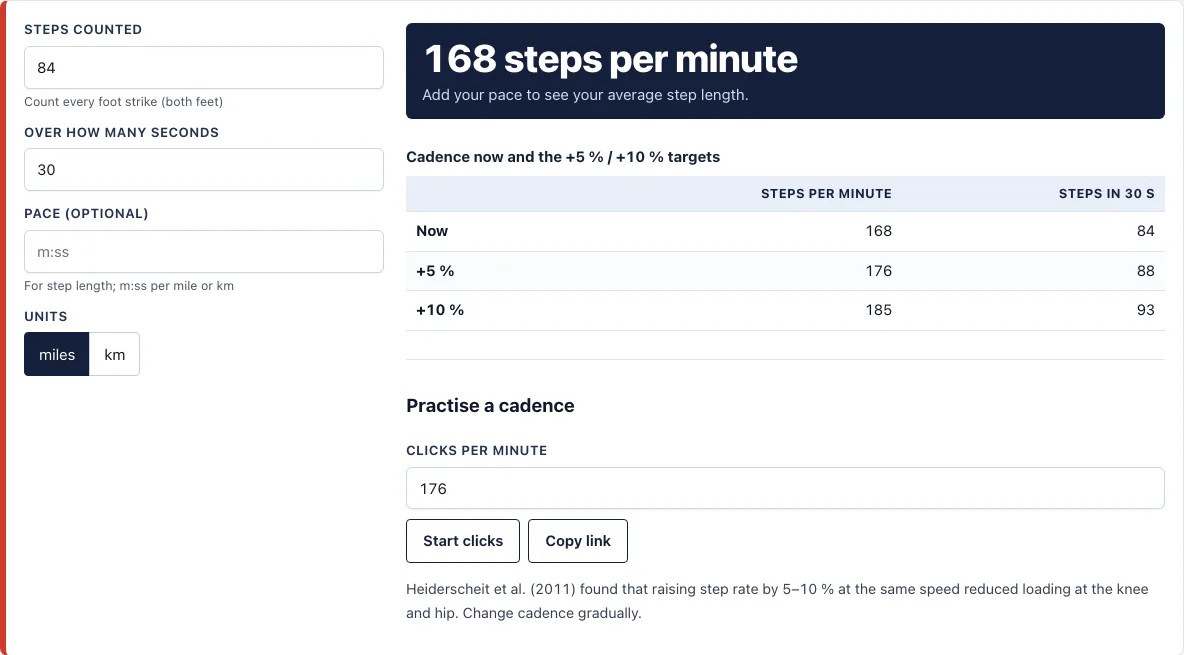
How to use the Running cadence calculator
- Count every foot strike, with both feet, for a set time. Use a watch or timer and 30 seconds is a common choice.
- Enter your count in Steps counted. For example, enter 84.
- Enter the time you counted in Over how many seconds. For example, enter 30.
- Optional: enter your usual speed in Pace to estimate step length.
- Use the miles / km switch to say whether your pace is per mile or per km.
- Read your cadence in steps per minute. With 84 steps in 30 seconds, the result is 168.
- Check the table for your current cadence and the +5% and +10% targets, along with the number of steps to count in 30 seconds.
- To practise a rate, enter clicks per minute and select Start clicks. Select Stop clicks when you are done.
Select Copy link to share or bookmark your exact result, because the settings are kept in the page address. Your miles / km choice is remembered in this browser. The page works on phones, and wide tables scroll sideways inside their box.
Count at your normal running pace, because cadence rises as you run faster. The Pace field is optional. If you leave it empty, you still get steps per minute, but no step length. Repeat the count two or three times and average the results to smooth out a miscount.
What is a good running cadence?
There is no single correct cadence. A good cadence depends on your speed, height, terrain and how tired you are, and it rises as you run faster. A figure of 180 steps per minute is often quoted, but it is not a requirement.
The calculator uses one formula for cadence: steps divided by (seconds divided by 60). For 84 steps in 30 seconds, that is 84 ÷ 0.5 = 168 steps per minute. When you add a pace, the tool divides your speed in metres per minute by your cadence to get average step length. At 9:00 per mile, you cover about 179 metres each minute, and 179 ÷ 168 gives a step length of about 1.06 metres (3.5 feet).
How do I measure my running cadence?
You measure cadence by counting steps over a known time and scaling the count to one minute. Count while you run at your normal pace on fairly flat ground. Count both feet, and count for at least 30 seconds so one miscount does not change the result much.
Measure at the speed you care about, because cadence changes with speed. Repeat the count two or three times and average the results. Enter the count and time in the calculator to convert it to steps per minute.
How does cadence change with speed?
Cadence rises as you run faster, so the same number of steps per minute does not mean the same effort at every pace. A slow jog usually has a lower cadence than a fast run. Compare like with like by measuring at the same pace each time.
Step length works the other way around. Because the tool divides speed by cadence, a faster pace at the same cadence gives a longer average step. That is why the pace field matters when you want a step length figure.
What is the click track for?
The click track plays beeps at the rate you choose, in clicks per minute, directly in your browser. Set the rate near your target and try to land one step on each beep. It is a practice aid: it gives you a steady rhythm to match while you keep the speed you want. Stop the clicks with Stop clicks whenever you want a normal run.
How this tool works and where the numbers come from
Target cadence is your current steps per minute raised by 5 percent and 10 percent. The step-rate research found that raising step rate by 5 to 10 percent at the same speed reduced loading at the knee and hip.
Sources
Frequently asked questions
Should I increase my cadence?
Not always, and not all at once. A 2011 study by Heiderscheit and colleagues found that increasing step rate by 5 to 10% at the same speed reduced loading at the knee and hip. Make changes gradually, and stop if they cause discomfort.
How do I practise a higher cadence?
Set the click track to your target rate in clicks per minute, then select Start clicks. Try to land one step on each beep, keeping the same speed. Select Stop clicks when you finish. Build up slowly over several runs.
What do the +5% and +10% targets mean?
They are your current cadence multiplied by 1.05 and 1.10. For example, 168 steps per minute gives a +5% target of 176 and a +10% target of 185. The table also shows the number of steps to count in 30 seconds for each target.
Is cadence the same as steps per minute?
Yes. The calculator reports cadence in steps per minute, so the two terms mean the same thing. Both count every foot strike, with left and right feet added together.
Does the tool count my steps automatically?
No. You enter the count and the time yourself. Nothing you type is uploaded or stored on a server.
Does the tool remember my units?
Yes, but only in this browser. The miles / km choice is remembered in this browser, and your other settings are kept in the page address, so the Copy link button shares the exact result.
Does the page work on a phone?
Yes. The page works on phones, and wide tables scroll sideways inside their box on small screens.
Related tools
- Pace calculator - use it to convert your pace and finish times before you add a pace to the cadence calculator.
- Treadmill pace chart - use it to match treadmill speeds with the pace you want to run.
- Treadmill incline calculator: Use this to see how an incline changes your treadmill pace.
- Heart rate zone calculator - use it to find effort zones for easy and hard runs.
- Beginner running plan - use it if you are building up to regular running.
- Training pace calculator - use it to set paces for different types of training.
- VO2 max calculator - use it to estimate your aerobic fitness.
- Methodology: formulas and plan rules - use it to see the formulas and rules behind the tools on this site.